SQL Multicast
Features Pricing Download Articles Support Sign in Get it free
Support Documentation Frequently asked questions Known issues Release notes Contact us My tickets
← All documentation
Introduction
  • Introduction
Install and first launch
  • Install and first launch: Installing
  • Install and first launch: Updates
  • Install and first launch: First launch
  • Install and first launch: The tour and the setup wizard
  • Install and first launch: If you already use SQL Multi Script
Core concepts
  • The shape of it
  • Workspace
  • Connection
  • Target, and target group
  • Project and script
  • Environment and variable
  • The two questions are independent
  • What a run is
  • Where everything is stored
  • Two people sharing a workspace
A first run, end to end
  • A first run, end to end
The window
  • The window
Workspaces
  • Workspaces: Creating one
  • Workspaces: Opening and adding
  • Workspaces: When a workspace has moved
  • Workspaces: Sharing through git
  • Workspaces: Per-machine overrides
  • Workspaces: Edits from outside
Connections
  • Connections: Registering a server
  • Connections: Authentication
  • Connections: Marking a connection production
  • Connections: Renaming and removing
Target groups
  • Target groups: Building a group
  • Target groups: Groups with several databases on one server
  • Target groups: Deleting a group
  • Target groups: Long groups
Projects and scripts
  • Projects and scripts
  • Projects and scripts: Creating and opening a project
  • Projects and scripts: The Project pane
  • Projects and scripts: The Scripts pane
  • Projects and scripts: Saving
  • Projects and scripts: Deleting a project
  • Projects and scripts: Scripts that have gone missing
The editor
  • The editor: Tabs
  • The editor: The status readout
  • The editor: Formatting
  • The editor: Error markers
IntelliSense
  • IntelliSense: Choosing the reference database
  • IntelliSense: The popup
  • IntelliSense: Refreshing
  • IntelliSense: The schema cache
  • IntelliSense: Drift annotations
Variables and environments
  • Variables and environments: The four types
  • Variables and environments: Overriding a type at one site
  • Variables and environments: The variable editor
  • Variables and environments: Built-in variables
  • Variables and environments: Seeing what resolved
  • Variables and environments: Failures
Running scripts
  • Running scripts: Preview first
  • Running scripts: What happens when you press F5
  • Running scripts: On-error policy
  • Running scripts: Batches
  • Running scripts: Parallelism and timeouts
  • Running scripts: Canceling
  • Running scripts: Re-running what failed
  • Running scripts: Transactions
Results
  • Results: The grouped list
  • Results: The detail pane
  • Results: All Servers
  • Results: Truncation warnings
  • Results: Export
Run history
  • Run history
Schema coverage scan
  • Schema coverage scan: Running it
  • Schema coverage scan: Reading the findings
  • Schema coverage scan: What a scan does and does not prove
  • Schema coverage scan: Fixing what it finds
Settings
  • Settings: Application
  • Settings: Project
  • Settings: Run history
  • Settings: IntelliSense
  • Settings: Shortcuts
  • Settings: What lives where
Importing from Red Gate SQL Multi Script
  • Importing from Red Gate SQL Multi Script: What comes across
  • Importing from Red Gate SQL Multi Script: Running the import
  • Importing from Red Gate SQL Multi Script: What is not imported
Keyboard and the command palette
  • Keyboard and the command palette
  • Keyboard and the command palette: Commands with no shortcut, deliberately
Beyond the desktop app
  • Beyond the desktop app
Troubleshooting
  • Troubleshooting
Glossary
  • Glossary
Appendices
  • File formats
  • Error codes
  • Known limitations
Command line (sqlmc)
  • What sqlmc is
  • What sqlmc is: Getting it
  • What ships today
  • Finding a workspace
  • Finding a workspace: Why the directory walk matters
  • Output and exit codes: Two shapes, one decision
  • Output and exit codes: Where output goes
  • Output and exit codes: Exit codes
  • sqlmc list coverage: Synopsis
  • sqlmc list coverage: What it does
  • sqlmc list coverage: Options
  • sqlmc list coverage: Production consent
  • sqlmc list coverage: Reading the report
  • sqlmc list coverage: Failure and cancellation
  • sqlmc list coverage: The JSON payload
  • sqlmc list coverage: Recipes
  • Credentials
  • Use from CI
  • Planned verbs
  • Error codes
  • Environment variables
MCP server
  • What this is
  • Running the server
  • Running the server: Wiring it into a client
  • Running the server: What the server runs as
  • Finding a workspace
  • The tools
  • sqlmc_script_complete: What it answers
  • sqlmc_script_complete: Parameters
  • sqlmc_script_complete: It degrades rather than refusing
  • sqlmc_script_complete: Result
  • sqlmc_script_complete: Item kinds
  • sqlmc_script_complete: Drift notes on items
  • sqlmc_script_complete: Worked exchange
  • sqlmc_list_coverage: What it answers
  • sqlmc_list_coverage: It asks before it connects
  • sqlmc_list_coverage: Parameters
  • sqlmc_list_coverage: Result
  • sqlmc_list_coverage: What a finding may and may not claim
  • sqlmc_list_coverage: Progress and long calls
  • sqlmc_list_coverage: Worked exchange
  • sqlmc_list_coverage: Using the two tools together
  • Security and what the agent can reach
  • Planned
Licensing
  • Which tier am I?
  • What the tiers actually differ on
  • How does the Pro trial work?
  • What happens if I cancel?
  • Do I have to sign in?
  • What if I cannot sign in — expired license, no network, corporate proxy?
  • Air-gapped machines and CI agents
  • Seats
  • Can I evaluate it before buying?
  • What do you collect?
  • Several accounts on one machine
Documentation / Command line (sqlmc)

sqlmc list coverage: Synopsis

sqlmc list coverage: Synopsis
Last updated 2026-10-21

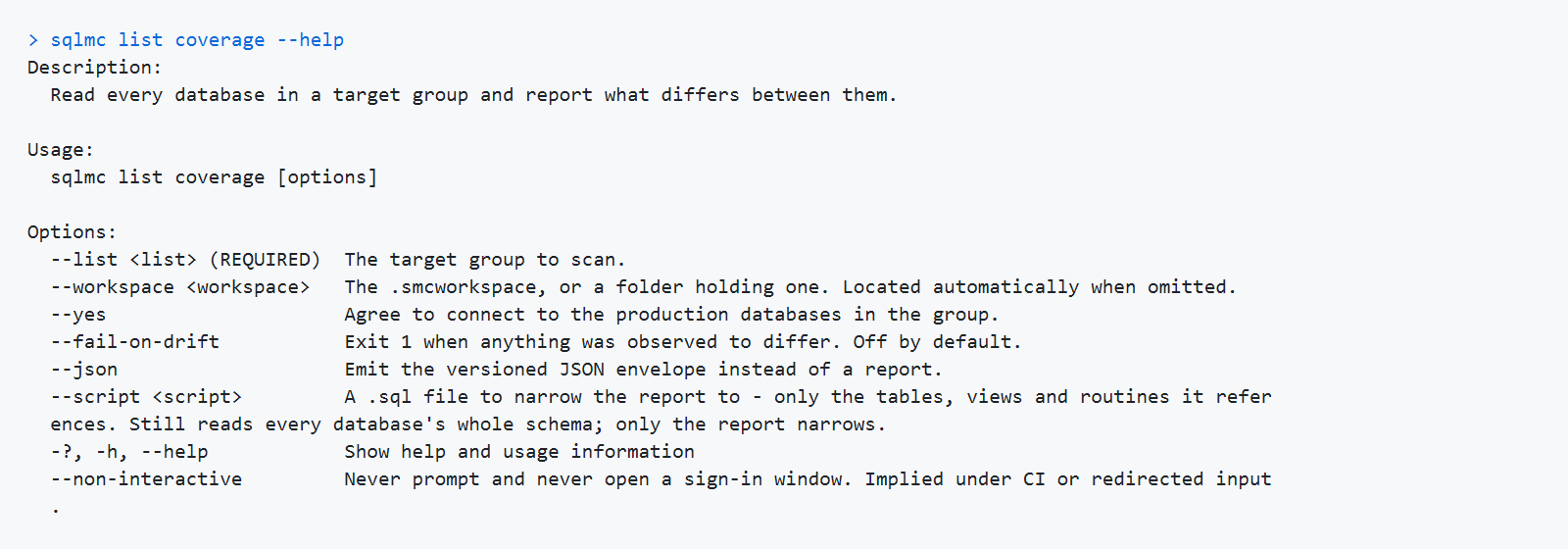
The sqlmc list coverage help: usage line and every option.
sqlmc list coverage --list <name> [--workspace <path>] [--yes] [--fail-on-drift] [--json]
← PreviousOutput and exit codes: Exit codes Next →sqlmc list coverage: What it does

© 2026 AERai Group LLC · SQL Multicast is a product of AERai Group LLC. · support@sqlmulticast.com

Licensing Articles Support About Privacy Terms