

How to deploy a schema change to every tenant database (database-per-tenant SQL Server)
A practical routine for rolling one schema change across dozens or hundreds of tenant databases - idempotent scripts, run order, what to do when some tenants fail, and how to prove it landed everywhere.
Published
Database-per-tenant is a good architecture right up until the first schema change. Then one
ALTER TABLE becomes forty, or four hundred, spread across several servers, and some of them will not
be in the state you expect. This article is a routine for doing it safely, whatever tool you use to
run the scripts.
1. Write the change so it can run twice
The single most useful habit: every script checks before it changes anything. A rollout across many databases will be interrupted: a server is unreachable, one tenant has a lock, someone cancels it. If every script is safe to run again, recovering from any of that is "run it again".
-- 0002-customer-loyalty-tier.sql
-- Safe to run twice: every step checks before it changes anything.

IF OBJECT_ID(N'dbo.SchemaVersion', N'U') IS NULL
    CREATE TABLE dbo.SchemaVersion
    (
        Version     int           NOT NULL PRIMARY KEY,
        Description nvarchar(200) NOT NULL,
        AppliedAt   datetime2(0)  NOT NULL CONSTRAINT DF_SchemaVersion_AppliedAt DEFAULT SYSUTCDATETIME()
    );
GO

IF COL_LENGTH(N'dbo.Customer', N'LoyaltyTier') IS NULL
    ALTER TABLE dbo.Customer ADD LoyaltyTier varchar(10) NULL;
GO

IF NOT EXISTS (SELECT 1 FROM dbo.SchemaVersion WHERE Version = 2)
    INSERT dbo.SchemaVersion (Version, Description) VALUES (2, N'Customer.LoyaltyTier');
GO
Two details matter here:
GObetween the steps. SQL Server compiles a batch before running it. A batch that adds a column and then uses it fails to compile on the databases where the column does not exist yet. Separate batches avoid that.- A version table in every tenant. It is how you answer "which tenants have migration 2?" with a query instead of a guess.
2. Put the scripts in a fixed order
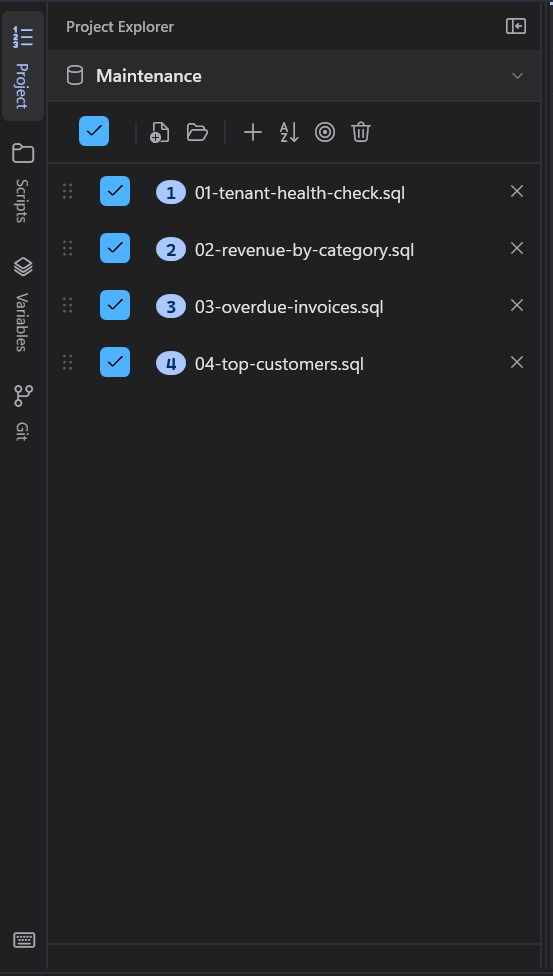
A real change is rarely one script. Adding a column, backfilling it, then adding the constraint that
depends on it is three steps that must run in that order, on every tenant. Number the files
(0002-add-column.sql, 0003-backfill.sql, 0004-constraint.sql) and run them in that order on each
database.
3. Rehearse on a copy of the estate
Run the full sequence against staging or a few restored tenant copies first. You are looking for the tenant that is different: the one with a customization, an old schema, or ten times the data. A rehearsal across all of staging finds those before production does.
4. Decide what happens when a tenant fails, before you start
Across a hundred databases, something will fail. Decide in advance which of these you want, because the right answer depends on the change:
| When a batch fails | Use it when |
|---|---|
| Stop that tenant, carry on with the others | Most schema changes. One bad tenant should not block ninety-nine good ones |
| Stop everything | The change is risky and you want to look at the first failure before anything else runs |
| Skip that script, carry on with the next | The scripts are independent of each other |
| Continue with the next batch | Read-only reports, where a failed batch loses one answer and nothing else |
A plain loop in PowerShell or T-SQL does whatever its error handling happens to do. Write it down before you start, not after the first failure.
Two more rules for large rollouts:
- Limit parallelism. Running against eight tenants at once is usually fine. Running against all four hundred on one server at once is a load test.
- Mind the transaction scope. Wrapping each tenant's whole change in a transaction lets a failure
roll that tenant back cleanly. Do it in the script with
BEGIN TRAN/COMMIT, deliberately, for the changes that need it.
5. Prove it landed everywhere
"It ran without errors" is not the same as "every tenant has the change". Run a verification query across every tenant afterwards:
SELECT
    DB_NAME() AS DatabaseName,
    (SELECT MAX(Version) FROM dbo.SchemaVersion) AS SchemaVersion,
    CASE WHEN COL_LENGTH(N'dbo.Customer', N'LoyaltyTier') IS NULL THEN 'missing' ELSE 'present' END AS LoyaltyTier;
Any row that says missing, or a version below 2, is a tenant to look at. Keep the output: it is
the evidence that the change is complete.
6. Re-run only what failed
Because the scripts are idempotent, the fix for a partial rollout is to run the same scripts again against the tenants that failed, after fixing whatever stopped them. Keep the list of failed tenants from the first run rather than rebuilding it by hand.
Doing this with SQL Multicast
Every step above works with a PowerShell loop and some discipline. SQL Multicast is the same routine with the bookkeeping built in:
- Target groups are your tenant lists: "All tenants", "EU tenants", "Staging". A group can span servers, and production is flagged, so a run that touches it stops and asks first.
- A project holds the numbered scripts in run order. Each one can be switched off without being removed.
- Pre-flight parses every script, resolves every variable for every tenant and checks that every database answers, before a single statement is sent. An unreachable tenant is reported before the run, not discovered half way through it.
- The on-error policy is one of the four in the table above, chosen for the project and overridable per run. The default is to stop that tenant and carry on with the rest.
- Parallelism is a project setting, four databases at a time by default.
- Results are grouped by script, so "did script 3 land on every tenant?" is one row with a count, and the tenants where it failed (and the scripts that were skipped because of it) are listed under it.
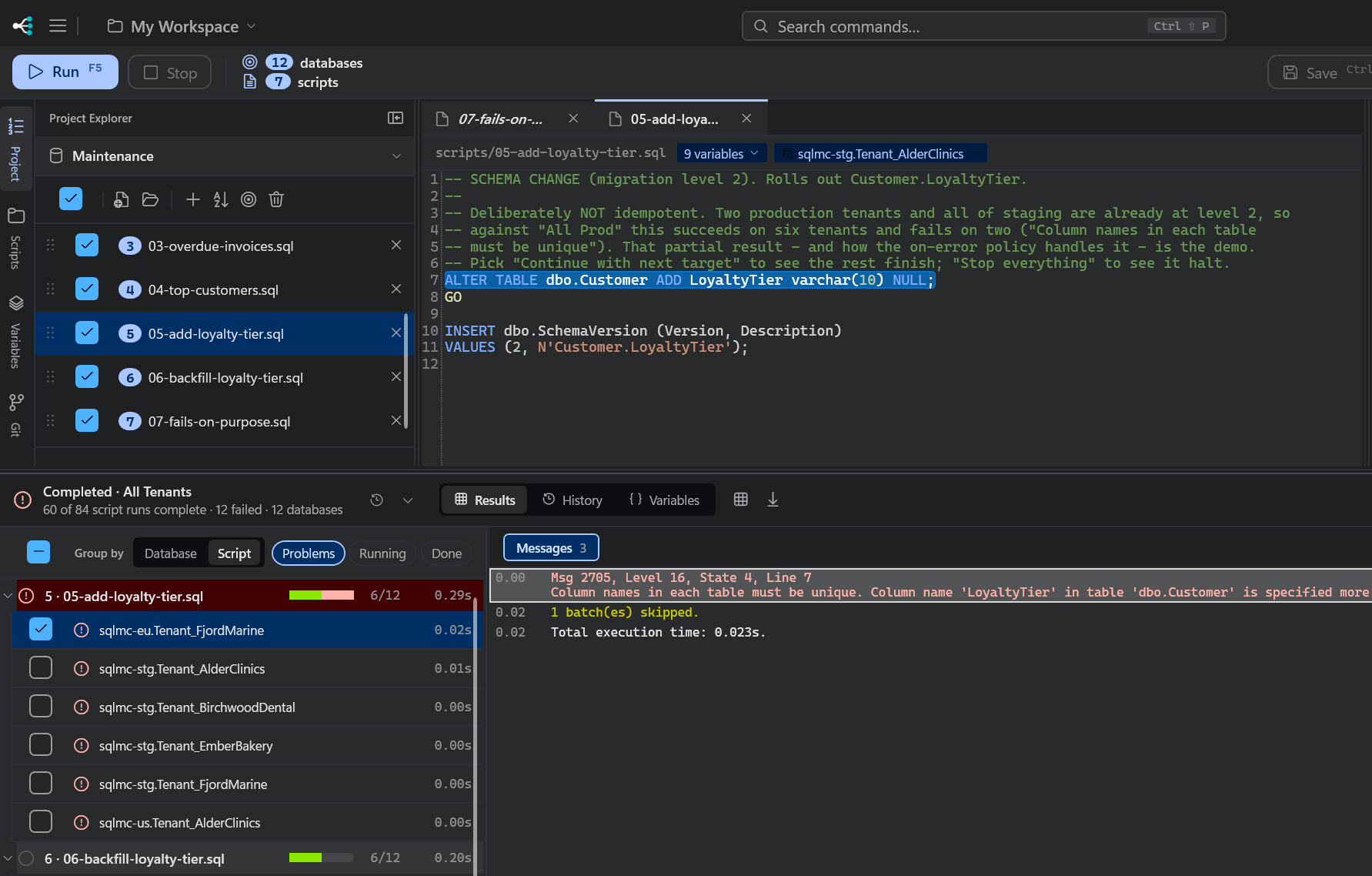
- Re-run failed runs the same scripts against only the tenants that failed last time.
- Run history keeps each run with every tenant's outcome, for when someone asks next month.
- Schema coverage scan reads every database in the group and reports what differs, such as
dbo.Customer.LoyaltyTier missing from 6 of 12, so you can find tenants that drifted before you write the next migration.
It is free for personal use, and Pro is $10 per seat per month for work. Download it, or read how runs work in the running scripts docs.