

How to run a SQL script against multiple databases in SQL Server
Five ways to run one script across many SQL Server databases, from sp_MSforeachdb to PowerShell to a dedicated tool, with working code and an honest note on where each one stops.
Published
You have one script and many databases: forty tenant copies of the same schema, a fleet of servers that all need the same index, or an estate where you need to know which database still has the old column. SQL Server Management Studio is built around one query window connected to one database, so "run this everywhere" is something you have to assemble yourself.
This guide covers the options, starting with what is free and built in. Every T-SQL sample below has been run against SQL Server 2025.
| Method | Many databases on one server | Many servers | Combined results | Free |
|---|---|---|---|---|
sp_MSforeachdb |
Yes, but it can skip some | No | No | Yes |
A cursor over sys.databases |
Yes | No | Yes, into a temp table | Yes |
sqlcmd in a loop |
Yes | Yes | No, one output file each | Yes |
dbatools Invoke-DbaQuery |
Yes | Yes | Yes | Yes |
| SSMS Registered Servers | One database name per window | Yes | Yes, if the shapes match | Yes |
| SQL Multicast | Yes | Yes | Yes | Free for personal use |
1. sp_MSforeachdb: quick, undocumented, and not reliable
Every SQL Server instance has an undocumented procedure that runs a command once per database, with
? standing in for the database name:
EXEC sp_MSforeachdb N'USE [?]; SELECT DB_NAME() AS DatabaseName, COUNT(*) AS UserTables FROM sys.tables;';
It is fine for a quick look on your own machine. It is not fine for anything you need to be sure of. It is unsupported, it returns one result set per database rather than one table, and it has a long history of skipping databases without an error on busy servers and with unusual database names. The details, and a way to check whether it skipped any, are in sp_MSforeachdb skips databases: why, and what to use instead.
2. A cursor over sys.databases (the reliable version)
The dependable way to do the same thing in plain T-SQL is to loop over sys.databases yourself and
call each database's own sp_executesql. Calling [SomeDb].sys.sp_executesql runs the command in
that database's context, with no USE and no string-building of database names:
SET NOCOUNT ON;
DECLARE @command nvarchar(max) = N'SELECT DB_NAME() AS DatabaseName, COUNT(*) AS UserTables FROM sys.tables;';
DECLARE @db sysname, @proc nvarchar(400);

CREATE TABLE #results (DatabaseName sysname, UserTables int);

DECLARE dbs CURSOR LOCAL STATIC READ_ONLY FORWARD_ONLY FOR
    SELECT name
    FROM sys.databases
    WHERE database_id > 4              -- skip master, tempdb, model, msdb
      AND state_desc = N'ONLINE'
      AND is_read_only = 0;

OPEN dbs;
FETCH NEXT FROM dbs INTO @db;

WHILE @@FETCH_STATUS = 0
BEGIN
    -- [db].sys.sp_executesql runs the command in that database's context.
    SET @proc = QUOTENAME(@db) + N'.sys.sp_executesql';
    INSERT #results EXEC @proc @command;
    FETCH NEXT FROM dbs INTO @db;
END

CLOSE dbs;
DEALLOCATE dbs;

SELECT DatabaseName, UserTables FROM #results ORDER BY DatabaseName;
QUOTENAME handles names with spaces and brackets, and the INSERT ... EXEC gives you one result
table instead of forty. Change the WHERE clause to choose which databases run.
Where it stops: one server only. The command is a string, so a multi-batch script with GO
separators has to be split by hand, and an error in one database stops the loop unless you wrap the
EXEC in TRY...CATCH and record it.
3. sqlcmd in a loop (many servers)
Once you need more than one server, you are outside a single T-SQL session. The sqlcmd utility runs
a script file against one server and database at a time, so a few lines of PowerShell can walk a list:
$targets = @(
    @{ Server = 'sql-prod-01'; Database = 'Sales' },
    @{ Server = 'sql-prod-02'; Database = 'Sales' }
)

New-Item -ItemType Directory -Force .\logs | Out-Null

foreach ($t in $targets) {
    # -b makes sqlcmd exit with an error code when the script fails
    sqlcmd -S $t.Server -E -d $t.Database -b -i .\change.sql -o ".\logs\$($t.Server)-$($t.Database).txt"
    if ($LASTEXITCODE -ne 0) { Write-Warning "Failed on $($t.Server)/$($t.Database)" }
}
sqlcmd understands GO and SQLCMD-mode directives, so the script file can be exactly what you would
run in SSMS. What you give up is a combined view: each target writes its own log file, and comparing
forty of them is now your job. See SQLCMD mode and variables, explained
for parameterizing the script.
4. dbatools Invoke-DbaQuery (PowerShell, done properly)
dbatools is the free PowerShell module most DBAs reach for, and it is very good
at this. Get the databases you want, pipe them into Invoke-DbaQuery, and the results come back as
objects you can sort, filter and export:
Get-DbaDatabase -SqlInstance sql-prod-01, sql-prod-02 -ExcludeSystem |
    Invoke-DbaQuery -File .\inventory.sql -AppendServerInstance |
    Export-Csv .\inventory.csv -NoTypeInformation
If you already live in PowerShell, this is hard to beat. It is scriptable, it goes into a scheduled task or a pipeline, and it costs nothing. What it does not give you is a place to read results: no grid grouped by script and database, no run history, and no guardrail between you and a production server other than the server list you typed.
5. SSMS Registered Servers and Central Management Server
SSMS can open one query window against a whole group of servers. Register the servers under View ▸ Registered Servers, right-click the group, choose New Query, and the results of every server come back merged with a Server Name column. It is built in and it is the first thing to try for read-only checks across servers.
It runs against one database name on every server, though, it keeps no history, and it fails when servers return different columns. The full walkthrough, and its limits, are in Query multiple SQL Servers at once in SSMS.
6. A dedicated tool
Once "run this everywhere" is a weekly job rather than a one-off, the pieces above start to show their seams: which databases did it actually run on, what failed, what was skipped because something earlier failed, and did anyone check it was not pointed at production?
That is the job SQL Multicast was built for. You register servers once, group databases
into named target groups, put your .sql files in a project in run order, and run them across the
group in one action. Every script on every database gets its own row in the results, with combined
grids across all of them.
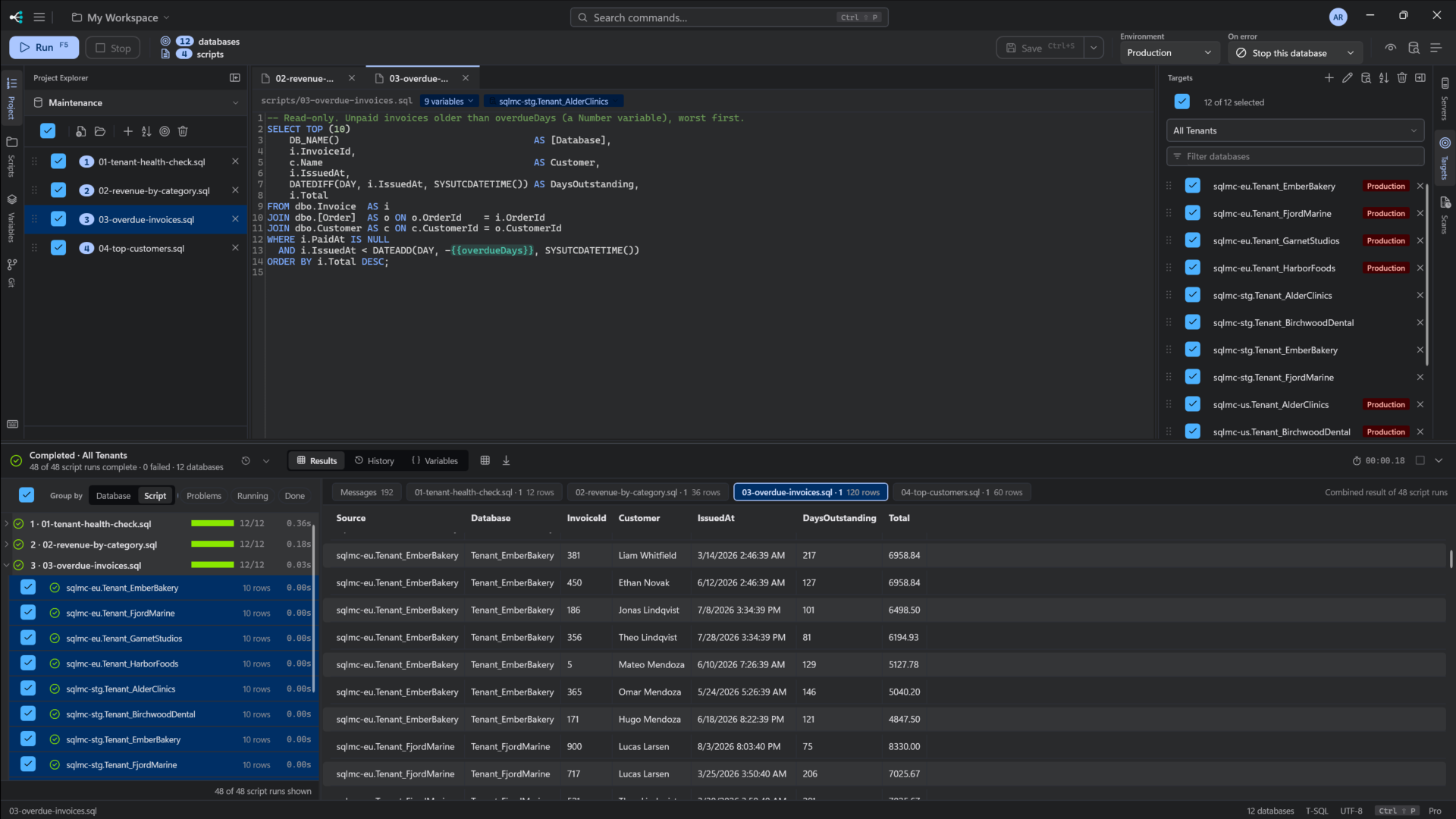
What it adds over a loop:
- Pre-flight before anything runs. Every script is parsed and split on
GO, every variable is resolved for every target, and every database is checked for reachability before a single statement is sent. - An on-error policy you choose up front: continue, skip the script, stop that database, or stop everything.
- A production flag on each connection, so a run that touches production stops and asks first.
- Run history, with each run's outcome and a sample of its results, so "did that land everywhere?" has an answer next week.
- Many databases on many servers in one run, including Azure SQL Database with Microsoft Entra ID.
It is free for personal use, with every feature, and Pro is $10 per seat per month for work. Download it free, or read the documentation first.
Which one should you use?
- A quick look on your own instance: the cursor in section 2. Skip
sp_MSforeachdb. - Many servers, scripted, and you are comfortable in PowerShell: dbatools.
- A read-only check across a handful of servers in SSMS: Registered Servers.
- Changes across many databases that you need to trust and review afterwards: a dedicated tool like SQL Multicast. If you are comparing tools, see the best tools to run a SQL script against multiple databases.