

The best tools to run a SQL script against multiple databases (2026)
A fair rundown of the tools for running one SQL script across many SQL Server and Azure SQL databases - SQL Multicast, Redgate SQL Multi Script, ApexSQL Propagate, dbForge Studio, dbatools, SSMS and Elastic Jobs - and which fits which job.
Published
Running one script across many databases is a job every SQL Server estate eventually needs: tenant databases, a fleet of servers, a change that has to land everywhere. There are free options built in, free options from the community, and paid tools built for exactly this. This is a rundown of the main ones, what each is good at, and where each stops.
We make SQL Multicast, which is on this list. Everything said about the other tools comes from their own documentation, checked in October 2026, and we have tried to give each its due.
At a glance
| Tool | Type | Many servers | Many databases per server | Azure SQL with Entra ID | Price |
|---|---|---|---|---|---|
| SQL Multicast | Desktop app, CLI, MCP | Yes | Yes | Yes | Free for personal use; Pro $99/year |
| Redgate SQL Multi Script | Desktop app | Yes | Yes | No | $498 per user per year |
| ApexSQL Propagate | Desktop app | Yes | Yes | Check | In the ApexSQL Fundamentals Toolkit |
| dbForge Studio for SQL Server | Full IDE | One server per run | Yes | Check | Paid IDE |
| dbatools | PowerShell module | Yes | Yes | Yes | Free |
| SSMS Registered Servers and CMS | Built into SSMS | Yes | One database per window | Local groups only | Free |
| Azure Elastic Jobs | Azure service | Azure SQL only | Yes | Yes | Agent and job database |
SQL Multicast
A desktop tool built for this one job. Register servers once, group databases into named target
groups that can span servers and mix on-premises SQL Server, Azure SQL Database and Managed Instance,
and run a project of ordered .sql scripts across a group in one action.
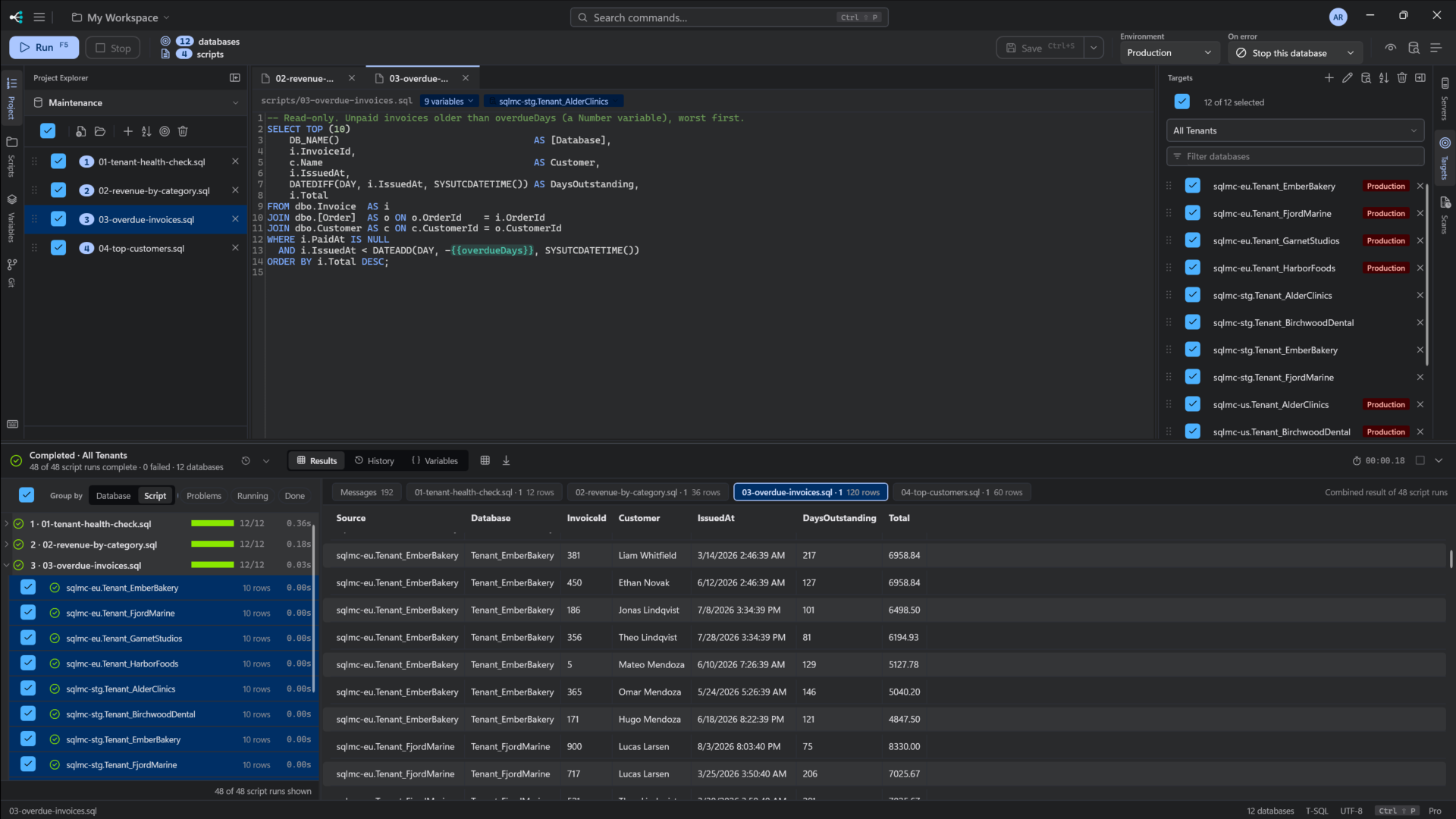
- Strengths: checks before anything runs (scripts parse, variables resolve, every database answers); a production flag that stops and asks; four on-error policies; results grouped by script or database with failed and skipped kept apart; run history; IntelliSense from your real schema; typed variables with per-environment values; Microsoft Entra ID; a workspace designed for git; a schema drift scan; a command line and an MCP server for AI assistants.
- Limits: Windows only. SQL Server only, for now. Entra ID uses the default credential flow only.
The command line ships
list coverageandmcptoday, so scripted runs still need the desktop app. It is new. - Price: Community is free for personal use with every feature (up to 5 connections and 25 databases per run). Pro is $10 per seat per month or $99 a year. See pricing.
Redgate SQL Multi Script
The best-known tool in this category, from a major SQL Server vendor. Distribution lists of databases, ordered scripts, parallel runs across servers, combined results with CSV export, and an on-error setting.
- Strengths: a long track record and a large vendor behind it. Included in Redgate's SQL Toolbelt Essentials, so many teams already have it.
- Limits: no run history, a single script view without IntelliSense, no Microsoft Entra ID authentication, no command line, and no SQLCMD variables.
- Price: $498 per user for a one-year subscription, with a 14-day trial.
We compare the two in detail in SQL Multicast vs SQL Multi Script.
ApexSQL Propagate
Quest's tool for running multiple scripts against multiple databases on many servers in one click. Saved script and database lists, ordered scripts, parsing before execution, results per database or per script, export to text or CSV, and parallel execution (added in 2019).
- Strengths: covers the core job, and comes with the rest of the ApexSQL Fundamentals Toolkit.
- Limits: check its current documentation for Entra ID, run history and automation. The most recent entry on its release notes page at the time of writing is from June 2024.
- Price: part of the ApexSQL Fundamentals Toolkit bundle.
More in SQL Multicast vs ApexSQL Propagate.
dbForge Studio for SQL Server
Devart's full SQL Server IDE includes running a script against several databases at once, in series or in parallel, with a result tab per database.
- Strengths: if you want one IDE for everything (design, compare, query, profile), multi-database execution comes with it.
- Limits: per Devart's own documentation, running against several databases in one operation works only when they are on the same server; databases on different servers need separate runs.
- Price: a paid IDE with several editions.
dbatools
The free, open-source PowerShell module most SQL Server DBAs already use. Get-DbaDatabase piped into
Invoke-DbaQuery runs a query or a script file across every database you select, on as many instances
as you list, and returns the rows as objects:
Get-DbaDatabase -SqlInstance sql-prod-01, sql-prod-02 -ExcludeSystem |
    Invoke-DbaQuery -File .\inventory.sql -AppendServerInstance |
    Export-Csv .\inventory.csv -NoTypeInformation
- Strengths: free, scriptable, schedulable, and enormously capable well beyond this one job. Hard to beat for automation.
- Limits: it is a building block. Error handling, a record of what ran where, a way to read results, and anything that stands between you and a production server are yours to write.
- Price: free.
SSMS Registered Servers and Central Management Server
Built into SQL Server Management Studio. Group servers locally or on a Central Management Server, right-click the group, New Query, and one window runs against every server, with results merged and a Server Name column added.
- Strengths: free, already installed, and quick for read-only questions across a few servers.
- Limits: one database per window; servers registered on a CMS must use Windows authentication; merged results fail when servers return different columns; nothing is kept after you close the window; no distinction between production and test.
- Price: free.
Walkthrough and details: Query multiple SQL Servers at once in SSMS.
Azure Elastic Jobs
Azure's own service for running T-SQL across many Azure SQL databases, on demand or on a schedule. An Elastic Job agent runs jobs against target groups, which can name a whole server or elastic pool so new databases are picked up automatically.
- Strengths: unattended, scheduled, inside Azure, with retries and Entra ID through a managed identity.
- Limits: Azure SQL Database targets only; an agent, job database, identity and per-database users to set up; jobs are T-SQL strings in stored procedure calls; results are in history tables.
- Price: the agent and its job database are billed Azure resources.
How to set it up, and the alternatives: Run a script across all your Azure SQL databases.
Which should you choose?
- Quick, read-only, a few servers: SSMS Registered Servers.
- Automation, and you live in PowerShell: dbatools.
- Scheduled jobs inside Azure: Elastic Jobs.
- You already have SQL Toolbelt Essentials: try SQL Multi Script first, since you have paid for it.
- You already use dbForge Studio and your databases share a server: its built-in multi-database execution.
- Interactive changes across many databases and servers that you need to check before they run and account for afterwards, including Azure SQL with Entra ID: SQL Multicast, free to start.
For the free, do-it-yourself routes in more depth, see How to run a SQL script against multiple databases in SQL Server.
SQL Multi Script and SQL Toolbelt Essentials are trademarks of Red Gate Software Ltd. ApexSQL is a trademark of Quest Software Inc. dbForge is a trademark of Devart. Facts checked October 2026.