

SQLCMD mode and variables, explained: :setvar, $(var), :connect and :on error
What SQLCMD mode is, how :setvar and $(variables) work in SSMS and sqlcmd, how :connect runs one script against several servers, and the pitfalls - with tested examples.
Published
SQLCMD mode is the oldest way to parameterize a T-SQL script and point it at more than one server, and
it still works in SSMS and in the sqlcmd utility today. It is also the source of a lot of confusion,
because the commands that start with a colon are not T-SQL at all. This guide explains what they are,
with examples that have been run against SQL Server 2025.
What SQLCMD mode is
sqlcmd reads your script before SQL Server does. Lines that start with a colon (:setvar,
:connect, :r, :on error) are instructions to sqlcmd, and $(Name) tokens are replaced with
variable values as text. What reaches SQL Server is the script after all of that has happened.
In SSMS you get the same behavior by turning on Query ▸ SQLCMD Mode. SQLCMD commands are then
shaded grey in the editor. Without SQLCMD mode, SSMS sends :setvar to SQL Server as-is, and you get a
syntax error.
Variables: :setvar and $(Name)
Define a variable with :setvar, use it with $(Name):
:setvar DaysBack 30

SELECT name, create_date
FROM sys.databases
WHERE create_date < DATEADD(DAY, -$(DaysBack), SYSUTCDATETIME())
ORDER BY create_date;
The substitution is plain text. $(DaysBack) becomes the characters 30 before SQL Server sees
the script. That is what makes it flexible (a variable can be a table name, a number or a whole
clause) and what makes it easy to get wrong.
From the command line, -v sets a variable without editing the file:
sqlcmd -S sql-prod-01 -E -v DaysBack=90 -i .\old-databases.sql
A :setvar inside the script wins over the -v value, so scripts meant to be driven from the command
line usually leave their :setvar lines out. Environment variables of the same name work too.
Running against several servers: :connect
:connect switches the connection part way through a script. Each batch after it runs on the new
server:
:on error exit
:setvar TargetDb "Sales"

:connect sql-prod-01
USE [$(TargetDb)];
SELECT @@SERVERNAME AS ServerName, DB_NAME() AS DatabaseName;
GO

:connect sql-prod-02
USE [$(TargetDb)];
SELECT @@SERVERNAME AS ServerName, DB_NAME() AS DatabaseName;
GO
Each server returns its own result set, so unlike SSMS's merged multi-server results it does not matter if they return different columns. It is the usual workaround when a multi-server query in SSMS cannot merge results.
:connect takes -U for a SQL login (:connect sql-prod-01 -U deploy), and prompts for or reads the
password. Windows authentication is the default.
Stopping on errors: :on error
:on error exitstops the whole script at the first error. Insqlcmdthe process exits with an error code, which is what a build or deployment script needs.:on error ignorecarries on. This is the default.
Combine :on error exit with sqlcmd -b in automation so a failure is a failed step rather than a
log file nobody reads.
Including files: :r
:r .\0002-add-column.sql pastes another file into the script at that point. It is how SQL Server
Database Projects build their deployment scripts, and how you can keep one small "driver" script that
runs a sequence of numbered migration files.
The pitfalls
- Quoting is your job.
$(Name)is pasted in as text, soWHERE Region = $(Region)breaks for text values andWHERE Region = '$(Region)'breaks when the value contains an apostrophe. There is no type to say "this is a string" or "this is an identifier". - The wrong value is not an error. An undefined
$(Name)stops the script with "'Name' scripting variable not defined", but a value left over from an earlier:setvar, or picked up from an environment variable of the same name, is used without complaint. - The server list lives in the script. Adding a server means editing every script that has a
:connectblock, and nothing stops a script written for staging from running against production. - It is one database per block. Many databases per server means one block each, or a loop inside the T-SQL.
How SQL Multicast does variables instead
SQL Multicast does not use SQLCMD syntax. It has its own variables, designed to remove
the pitfalls above. If you are bringing scripts over, replace $(Name) with {{name}} and drop the
:setvar and :connect lines: where the script runs comes from the target group, not from the file.
- Variables are typed. Each one is declared once as
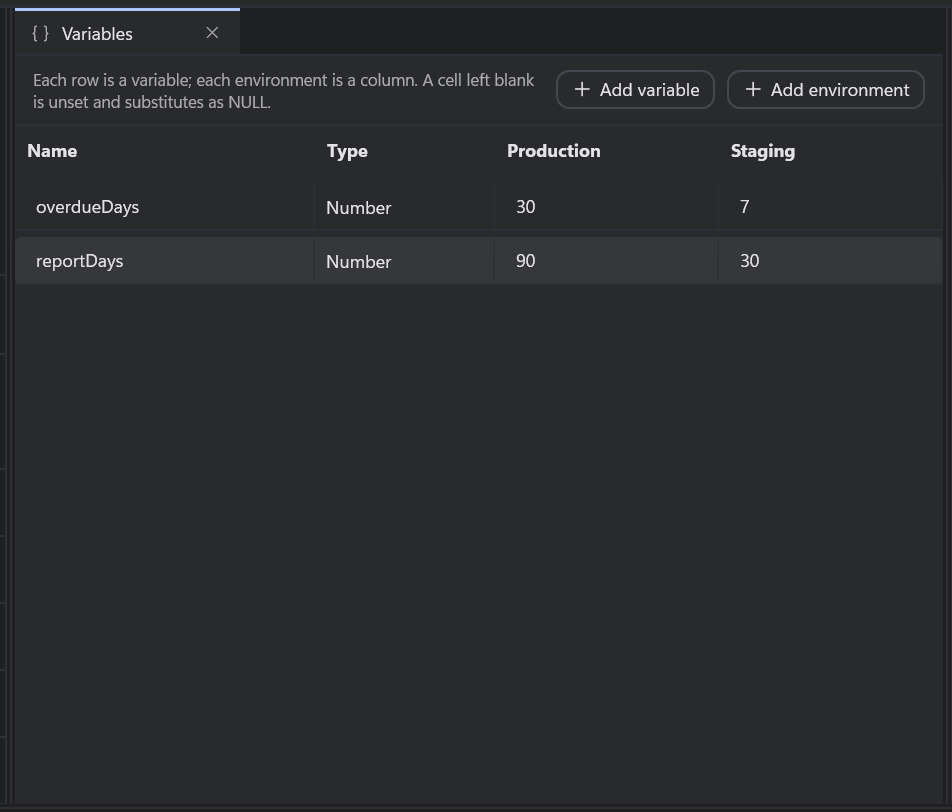
text,identifier,numberorraw, and the type decides the quoting.{{region}}declared astextbecomes a correctly escaped string literal, apostrophes included. Anumberthat is not a number stops the run before it starts. - Values live in environments. A variable has one column of values per environment (Production, Staging), and choosing the environment for a run changes every value at once without editing a script.
- An undeclared variable stops the run at pre-flight, before a single statement is sent.
- Built-in variables such as
{{target.database}}and{{target.server}}resolve per database, which is what a:connectblock per server was approximating. - Preview shows the exact SQL one database will receive, after substitution.
It is free for personal use. Download it, or read the full rules in the variables and environments docs.