

SQL Multicast vs Redgate SQL Multi Script: an honest comparison
How SQL Multicast and Redgate SQL Multi Script compare for running scripts across many SQL Server databases - what both do, where they differ, pricing, and who should pick which.
Publicado el
If you run the same scripts across many SQL Server databases, you have probably come across Redgate SQL Multi Script. It has been the best-known tool for this job for over a decade. SQL Multicast does the same job, so this is the comparison you would want to read before choosing: what is the same, what is different, and what each costs.
We make SQL Multicast, so read this with that in mind. We have tried to be fair, and every claim about Multi Script below is based on SQL Multi Script 1.7, Redgate's public documentation and pricing as checked in October 2026. If something has changed, tell us and we will correct it.
The short version
| SQL Multicast | SQL Multi Script | |
|---|---|---|
| Run many scripts across many databases | Yes | Yes |
| Saved lists of databases | Target groups | Distribution lists |
| Parallel execution | Yes | Yes |
| Script run order | Yes | Yes |
| Combined results across databases | Yes | Yes |
| Export results | CSV, and an Excel workbook of every grid | CSV and text |
| On-error setting | Four policies, or per script | Yes |
| Run history | Yes | No |
| Multiple script tabs | Yes | No |
| IntelliSense from your real schema | Yes | No |
| Git panel | Yes | No |
| Microsoft Entra ID authentication | Yes (default credential flow) | No |
| Typed variables with per-environment values | Yes | No SQLCMD variables |
| Schema drift scan across databases | Yes | No |
| Command line and AI agent (MCP) | sqlmc list coverage, sqlmc mcp |
No |
| Imports Multi Script projects and lists | Yes | - |
| Price, one user, one year | $99 (or $10 a month) | $498 |
| Free tier | Yes, for personal use, every feature | 14-day trial |
What both do well
Credit where it is due. Both tools have the core of the job covered, and Multi Script does it well:
- Saved lists of databases. Multi Script's distribution lists and SQL Multicast's target groups are the same idea: name a set of databases once, run against the set.
- Many scripts, in order. Both run a sequence of
.sqlfiles in a fixed order on each database. - Parallel runs across databases.
- Combined results. Both show the output from every database together, and export it to CSV.
- An on-error setting that decides what a failure does to the rest of the run.
If those five things are all you need, both will do the job, and the decision is mostly price.
Where SQL Multicast is different
Run history
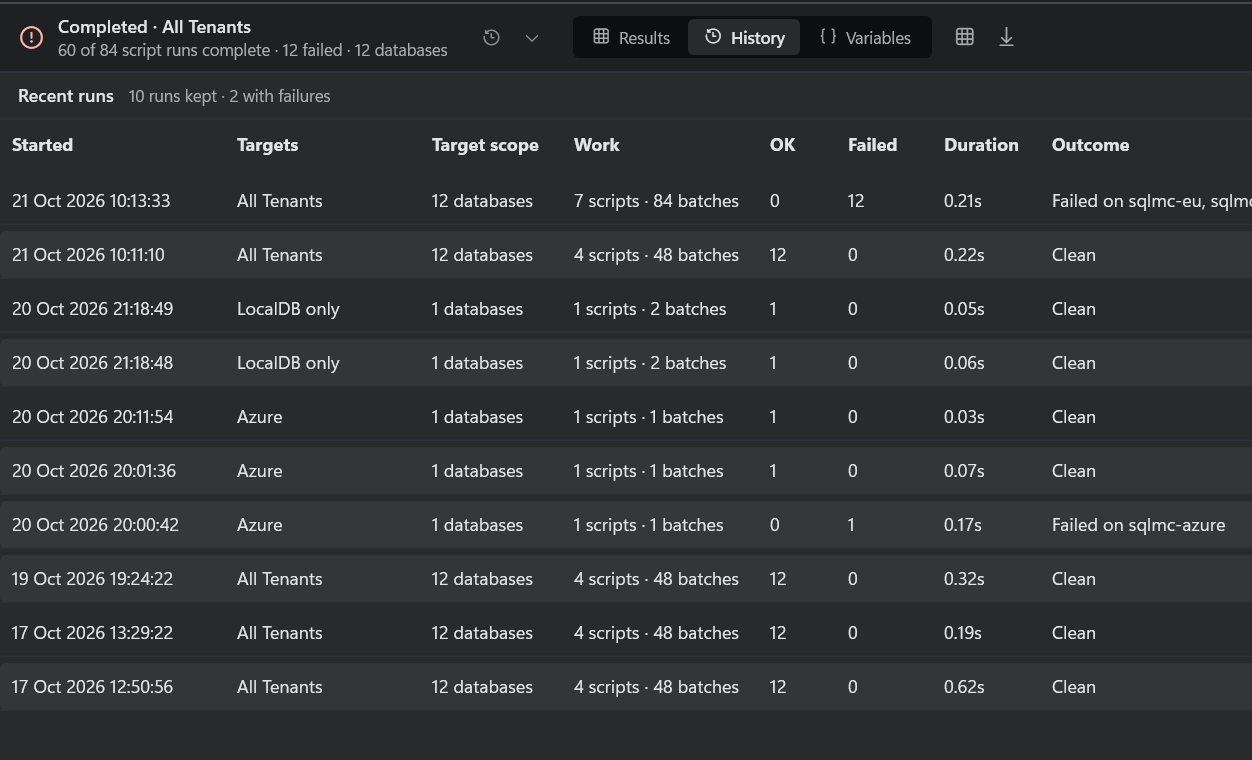
Multi Script shows you the current run. SQL Multicast keeps every run: when it started, which target group, how many scripts and databases, how many succeeded and failed, how long it took, and whether it was clean, failed, blocked before it started, or canceled. Double-click one to load its results back. "Did last Tuesday's change land everywhere?" has an answer.
An editor you can work in
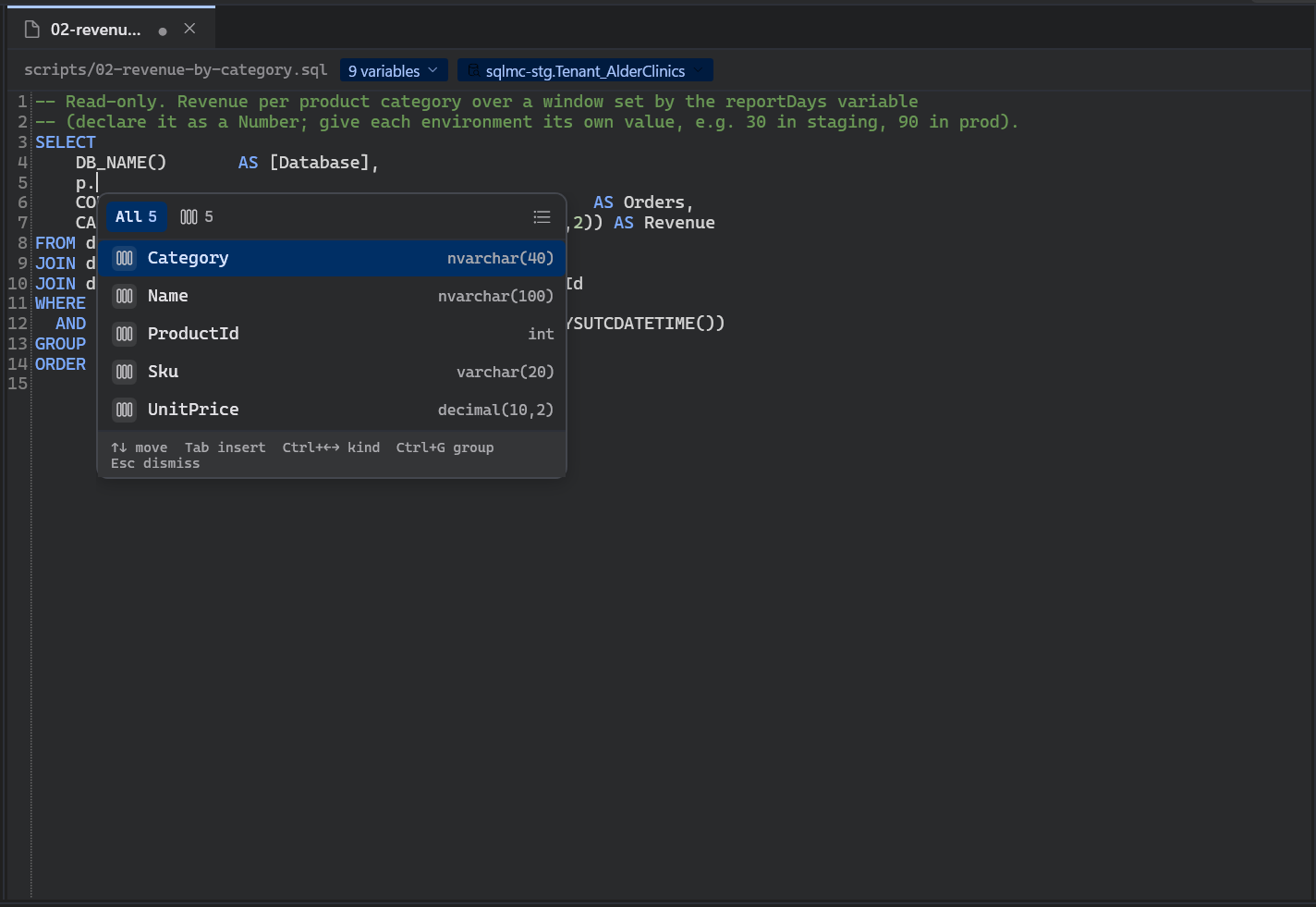
Multiple script tabs, a formatter (Ctrl+K), error markers on the failing line, and IntelliSense
that reads real table and column names from a database you pick, ideally a non-production one. Multi
Script has a single script view and no completion.
Microsoft Entra ID
SQL Multicast connects to Azure SQL Database and Managed Instance with Microsoft Entra ID, using the default credential flow that picks up whatever the machine is already signed in with. Multi Script supports Windows and SQL Server authentication only, which rules out Entra-only Azure servers.
Variables and environments
Redgate's support has said Multi Script does not support SQLCMD variables. SQL Multicast has its own
variable system instead: write {{name}} in a script, declare the variable once with a type
(text, identifier, number or raw) so quoting is decided once and correctly, and give it a value
per environment. Switching from Staging to Production values is one choice, not an edit. Covered in
SQLCMD mode and variables, explained.
Checks before anything runs, and a production guardrail
Before a single statement is sent, SQL Multicast parses every script, resolves every variable for every database, and checks that every database answers. An unreachable server is a message before the run, not a half-applied change. Connections can be flagged as production, and a run that touches one stops and asks first.
Built for git
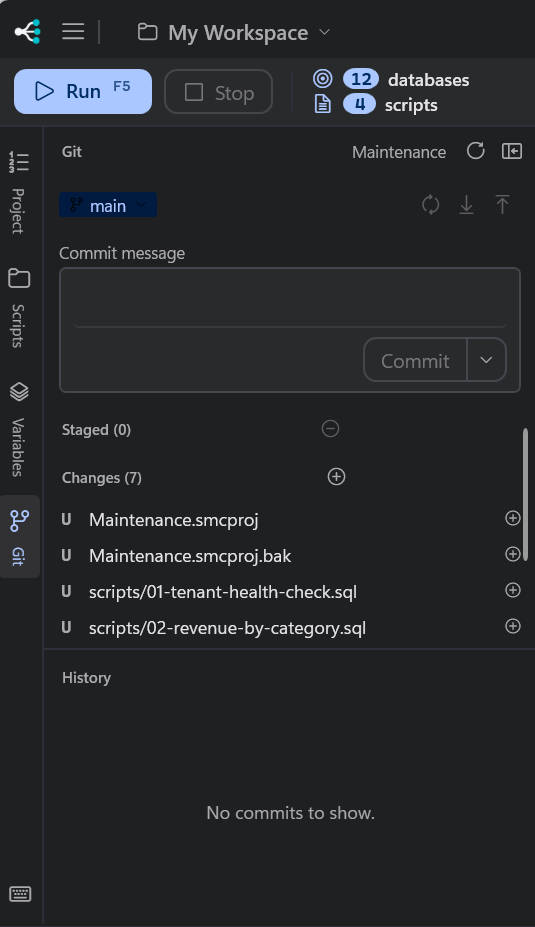
A workspace (connections, target groups, environments, projects) is a set of plain files designed to be committed, with passwords kept in the Windows credential store rather than the files. A Git panel in the app commits and syncs without leaving it.
Drift scan, command line and MCP
A schema coverage scan reads every database in a group and reports what differs:
dbo.Customer.LoyaltyTier missing from 6 of 12. The same engine is available from the sqlmc command
line (sqlmc list coverage today; running scripts from the command line is not built yet) and as an
MCP server, so an AI assistant can read your estate's schema without being given a query window.
See the CLI and MCP docs.
Where Multi Script has the edge
- Track record. Multi Script has been in production use for over a decade, from a large and well-known vendor. SQL Multicast is new.
- A bundle you may already own. Multi Script is part of Redgate's SQL Toolbelt Essentials. If your team already pays for that, it costs you nothing extra.
- Breadth of the vendor. Redgate makes a whole family of SQL Server tools that work together.
Price
Redgate lists SQL Multi Script at $498 per user for a one-year subscription, with volume pricing for larger teams and a 14-day trial.
SQL Multicast Pro is $99 per seat per year, or $10 a month, with every feature and no limits. Community is free for personal projects, learning and open source, with every feature, up to 5 connections and 25 databases per run. Larger organizations can get an Enterprise license. See pricing.
Moving from Multi Script
SQL Multicast imports Multi Script's .smsproj project files and exported distribution lists
(.smsdl): projects, their scripts, target groups, and one connection per distinct server. On a first
launch it offers to do it if it finds Multi Script installed, or use Project ▸ Import from SQL Multi
Script at any time. Passwords are not imported; you enter each one once.
The import docs have the details.
Who should pick which
- Pick SQL Multi Script if your team already has SQL Toolbelt Essentials, or you want a long-standing vendor above everything else.
- Pick SQL Multicast if you want run history, a real editor with IntelliSense, Microsoft Entra ID for Azure SQL, typed variables, a workspace that lives in git, or simply a fifth of the price.
The fastest way to decide is to run both against the same databases. Multi Script has a 14-day trial, and SQL Multicast's Community tier is free with no time limit: download it and import your existing Multi Script projects to try it on real work.
SQL Multi Script and SQL Toolbelt Essentials are trademarks of Red Gate Software Ltd. SQL Multicast is not affiliated with Redgate. Facts checked October 2026.