

How to run a script across all your Azure SQL databases
Three ways to run one T-SQL script across many Azure SQL databases with Microsoft Entra ID - Elastic Jobs, a PowerShell loop, and a desktop tool - and how to choose between them.
Publicado el
On-premises, you can at least loop over sys.databases inside one instance. Azure SQL Database does
not let you: each database is its own island, there is no USE to another database, and the
instance-level tricks do not apply. Running one script across a logical server's databases, or across
several servers, needs something outside the database.
Here are the three practical options, with Microsoft Entra ID authentication, since that is what most Azure estates use now.
First, list the databases
Whatever runs the script needs the list. From the logical server's master database:
SELECT name
FROM sys.databases
WHERE name <> N'master'
ORDER BY name;
Or from PowerShell, across a resource group, with the Az module:
Get-AzSqlDatabase -ResourceGroupName rg-tenants -ServerName tenants-eu |
    Where-Object DatabaseName -ne 'master' |
    Select-Object ServerName, DatabaseName
Option 1: Elastic Jobs (Azure-native, scheduled)
Elastic Jobs is Azure's built-in way to run T-SQL across many Azure SQL databases, on demand or on a schedule. You create an Elastic Job agent backed by a job database, define a target group, and add jobs with T-SQL steps. A target group can name a whole logical server or elastic pool, in which case the databases are worked out at run time, so a new tenant is picked up without anyone editing a list.
With Microsoft Entra ID, Microsoft recommends a user-assigned managed identity on the job agent, with a database user for that identity in each target. The jobs themselves are defined in T-SQL in the job database:
EXEC jobs.sp_add_target_group @target_group_name = N'AllTenants';

EXEC jobs.sp_add_target_group_member
    @target_group_name = N'AllTenants',
    @target_type       = N'SqlServer',
    @server_name       = N'tenants-eu.database.windows.net';

EXEC jobs.sp_add_job
    @job_name    = N'AddLoyaltyTier',
    @description = N'Customer.LoyaltyTier';

EXEC jobs.sp_add_jobstep
    @job_name          = N'AddLoyaltyTier',
    @target_group_name = N'AllTenants',
    @command           = N'IF COL_LENGTH(N''dbo.Customer'', N''LoyaltyTier'') IS NULL
                               ALTER TABLE dbo.Customer ADD LoyaltyTier varchar(10) NULL;';

EXEC jobs.sp_start_job @job_name = N'AddLoyaltyTier';
Progress is in the job database's jobs.job_executions view.
Good at: scheduled, unattended work, inside Azure, with nothing running on anyone's laptop. Dynamic targets. Retries.
Less good at:
- Azure SQL Database only. On-premises SQL Server and Managed Instance are not targets.
- Setup and cost. An agent, a job database, a managed identity and a user in every target database before the first run. The agent is a billed resource.
- The script is a string in a stored procedure call. Every quote is doubled, and a multi-step change is several job steps.
- Reading results means querying job history tables, not looking at a grid.
- Jobs retry, so every step must be safe to run twice. That is good practice anyway; see deploying a schema change to every tenant database.
Option 2: a PowerShell loop with Entra ID
For an ad hoc run, a loop from your own machine is quicker to set up. With the Az module signed in
(Connect-AzAccount), get a token for Azure SQL and pass it to each connection:
$token = (Get-AzAccessToken -ResourceUrl 'https://database.windows.net/').Token
$server = 'tenants-eu.database.windows.net'

$databases = Get-AzSqlDatabase -ResourceGroupName rg-tenants -ServerName tenants-eu |
    Where-Object DatabaseName -ne 'master'

foreach ($db in $databases) {
    Invoke-Sqlcmd -ServerInstance $server -Database $db.DatabaseName `
        -AccessToken $token -InputFile .\change.sql -ErrorAction Continue
}
On recent versions of the Az module, Get-AzAccessToken can return the token as a SecureString;
convert it to plain text for Invoke-Sqlcmd or use dbatools' Connect-DbaInstance -AccessToken
instead. The newer Go-based sqlcmd can also sign in by itself with
--authentication-method ActiveDirectoryDefault.
Good at: quick, free, uses the identity you are already signed in with, and it can mix in on-premises servers.
Less good at: you write and maintain the error handling, the output is whatever you capture, and nothing records afterwards which databases succeeded.
Option 3: SQL Multicast
SQL Multicast is a desktop tool for exactly this job, and it treats Azure SQL like any other server. Register the logical server once with Microsoft Entra ID authentication, which uses the same default credential flow as Azure's own tools (it picks up whatever the machine is already signed in with, such as the Azure CLI or Visual Studio), so there is no token handling and no password stored.
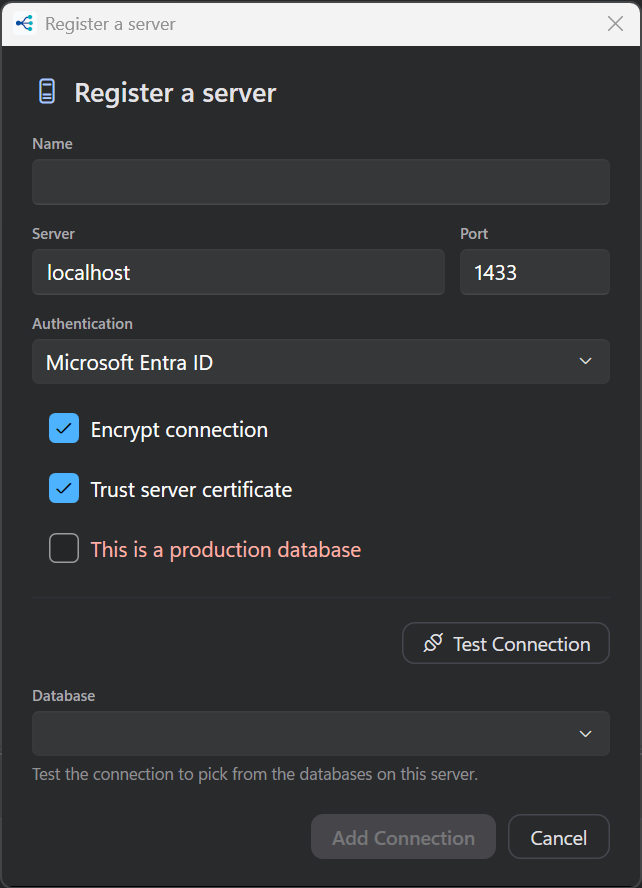
Then build a target group from its databases (expanding the server lists them), add your scripts to a project, and run. One group can mix Azure SQL Database, Azure SQL Managed Instance and on-premises SQL Server, which Elastic Jobs cannot.
Before anything runs, every script is parsed, every variable is resolved and every database is checked to be reachable, which in Azure is where firewall rules and missing database users show up. Results come back per database, with combined grids, and every run is kept in history.
It is free for personal use (up to 5 connections and 25 databases per run), and Pro is $10 per seat per month for work.
Which to choose
| Elastic Jobs | PowerShell loop | SQL Multicast | |
|---|---|---|---|
| Runs on | Azure | Your machine or a build agent | Your machine |
| Scheduled and unattended | Yes | With a scheduler | No |
| On-premises and Managed Instance | No | Yes | Yes |
| Setup before the first run | Agent, job database, identity, users | Az module | Register the server |
| Results | Job history tables | Whatever you capture | Grid per database, combined grids, history |
| Cost | The agent and job database | Free | Free for personal use |
Recurring, unattended work inside Azure is what Elastic Jobs is for. A one-off from a script is a PowerShell loop. Interactive work (rolling out a change, checking a value everywhere, reading the answers, and keeping a record) is what SQL Multicast is built for.