

How to check what ran last week with run history
Every run is recorded - targets, outcome, duration and a result sample - so you can answer "did that go out everywhere?" without guessing.
Publicado el
"Did the change run on all the tenants?" You should be able to answer that from a record, not memory.
Open the History tab
Past runs are listed newest first.
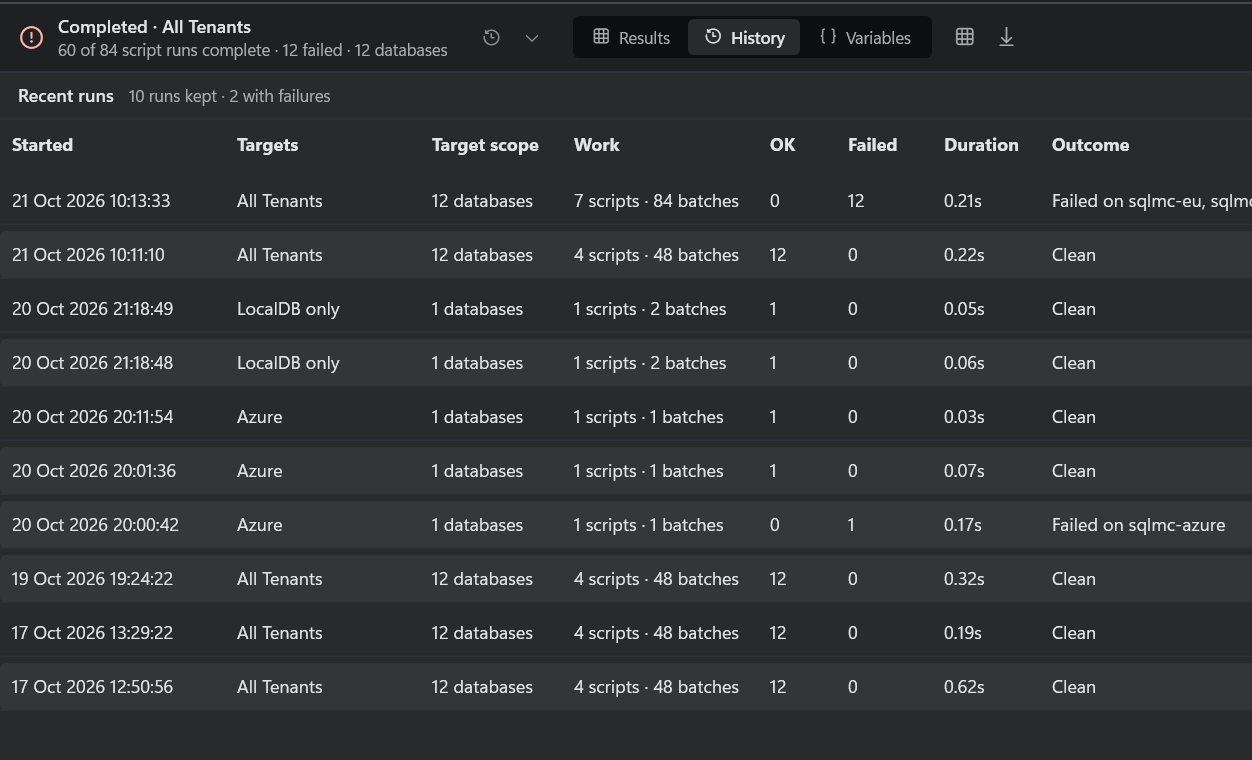
Each row shows when it started, the target group, how many databases, the scripts and batches run, the OK and failed counts, the duration and the outcome: clean, failed, blocked or canceled.
Blocked is kept separate from failed on purpose. A run that never got past pre-flight sent no statements, and recording it as though it completed is how a failed deployment gets logged as a successful one.
Replay a run
Double-click a run to load it back into the results view. The header says it is a replay. Only the first 100 rows of each result are stored, so use Save as… during a run to keep the full result.
Good to know
- Retention defaults to five days.
- Logs live in
%APPDATA%\SqlMulticast\runs\; Run ▸ Open log folder takes you there. - Secrets are scrubbed from logs when they are captured.
Details: run history.