

SQL Multicast vs ApexSQL Propagate
How SQL Multicast and Quest's ApexSQL Propagate compare for running SQL scripts across many databases and servers, based on each product's own documentation, with what to check in a trial.
Publicado el
ApexSQL Propagate, now part of Quest's ApexSQL range, runs SQL scripts against many databases on many SQL Servers in one action. SQL Multicast does the same job. This page compares them on what each product's own documentation says, as checked in October 2026, and lists what to try for yourself if you are choosing between them.
We make SQL Multicast. We have not yet run ApexSQL Propagate ourselves, so we say nothing here about what it is like to use. Where its documentation is silent, we say so rather than guess. If something is out of date, tell us.
What ApexSQL Propagate does
According to Quest's product page and ApexSQL's own guides and release notes:
- Runs multiple scripts against multiple databases on any number of SQL Servers, with one click.
- Script lists and database lists can be saved and reused, and the scripts' run order is set in the list.
- Scripts can be parsed before execution to catch problems early.
- Results can be reviewed per database or per script, with error messages in a Results pane, and exported to text or CSV.
- Parallel execution across databases was added in the 2019 release.
- It is sold as part of the ApexSQL Fundamentals Toolkit for SQL Server bundle, and requires activation.
The most recent entry on ApexSQL's Propagate release notes at the time of writing is from June 2024.
What both do
On the documented features, the two tools cover the same core: saved lists of databases, ordered script lists, runs across many servers, parallel execution, a check before running, results per database, and CSV export. For straightforward "run these scripts there" work, either will do it.
What SQL Multicast adds
Everything here is in the SQL Multicast documentation. These are the areas to compare, whichever way they come out for Propagate in your trial:
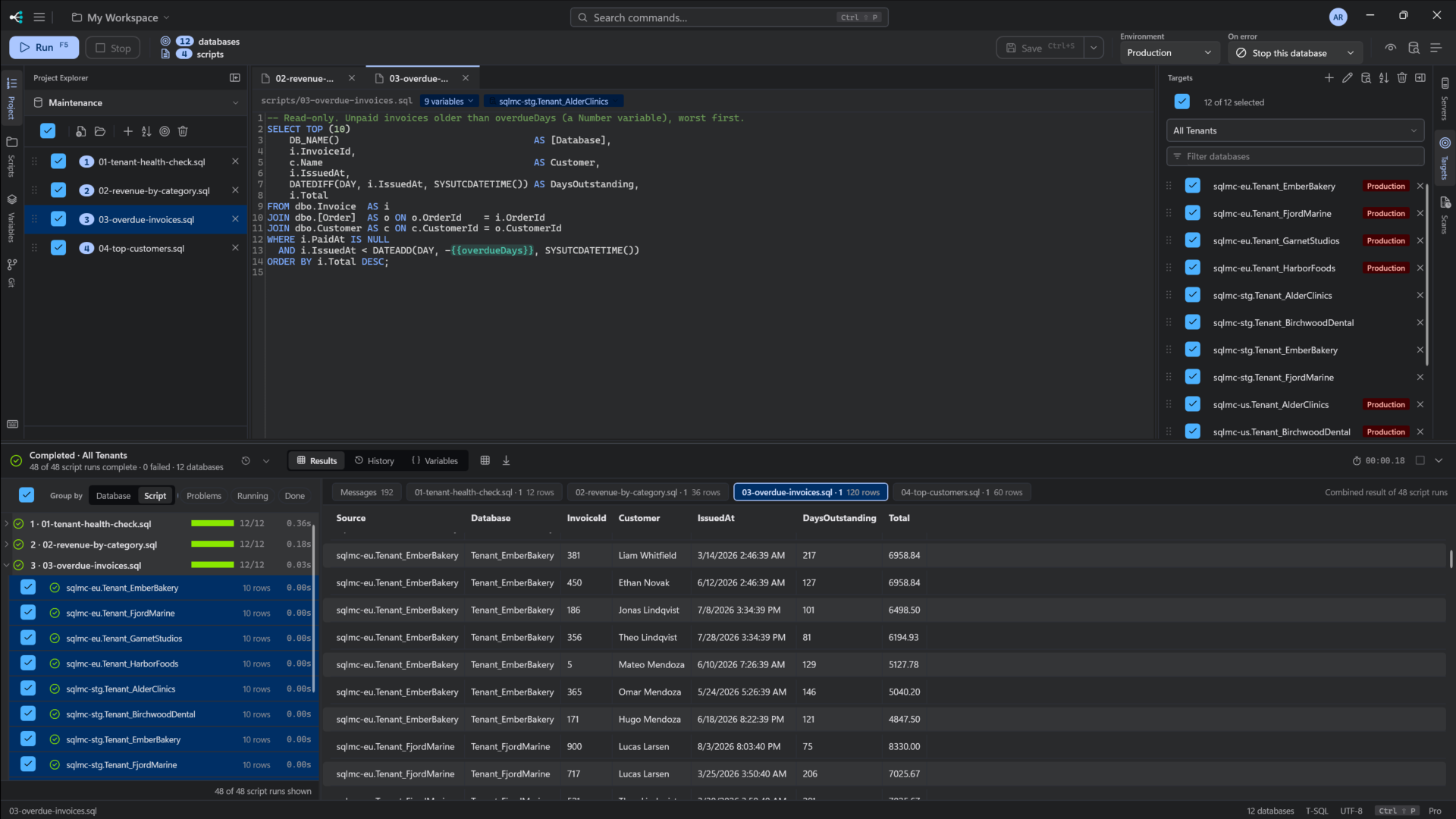
- Run history. Every run is kept with its target group, scope, per-database outcome, duration and a sample of its results, and can be loaded back.
- Pre-flight that checks every database answers before a single statement is sent, as well as parsing every script and resolving every variable.
- A production guardrail. Connections can be flagged as production, and a run that touches one stops and asks first.
- Four on-error policies, or one per script: continue, skip the script, stop that database, or stop everything. Results distinguish a script that failed from one that was skipped because an earlier script stopped that database.
- Microsoft Entra ID for Azure SQL Database and Managed Instance, alongside Windows and SQL logins.
- Typed variables with per-environment values, so the same scripts run with Staging or Production values without editing them. See SQLCMD mode and variables, explained.
- An editor with IntelliSense from your real schema, multiple tabs and a formatter.
- A workspace that lives in git, with a Git panel in the app and no passwords in the files.
- A schema coverage scan that reports what differs across a group of databases.
- A command line and an MCP server for AI assistants (
sqlmc list coverageandsqlmc mcptoday).
Price
ApexSQL Propagate is sold within the ApexSQL Fundamentals Toolkit; check Quest's site for current pricing.
SQL Multicast Pro is $99 per seat per year, or $10 a month, and Community is free for personal use with every feature, up to 5 connections and 25 databases per run. See pricing.
What to check in a trial
Run the same job in both: one multi-step change, a target list that mixes on-premises SQL Server and Azure SQL, and at least one database that is offline or will fail. Then compare:
- Authentication. Can it connect to Azure SQL with Microsoft Entra ID?
- The failure. What happens to the other databases, and to later scripts on the failing one? Can you tell failed from skipped?
- Afterwards. Next week, can you see what that run did on each database?
- Production. Does anything stop you running a change against production by mistake?
- Variables. Can the same scripts run with different values per environment?
- Automation. Is there a command line, and what can it do?
- Currency. What is the current version, and when was it released?
SQL Multicast's Community tier is free with no time limit, so you can run that comparison on real work: download it.
ApexSQL and ApexSQL Propagate are trademarks of Quest Software Inc. SQL Multicast is not affiliated with Quest. Facts checked October 2026.